Showing posts with label parent communication. Show all posts

Tuesday, November 3, 2015

The Time I Met My Idols!!

My husband and I took a trip last summer to San Francisco to celebrate 10 years of marriage! I am blessed with great parents who watched the kids and allowed us to go spend 8 days not worrying about what was on the kids' menu at restaurants!!

My fabulous hubby planned the whole entire thing... except for one day which I set the agenda for!  TOP on my agenda for the entire week (not that I wasn't looking forward to alone time with you, sweetie!) was lunch with the masterminds behind my favorite app on the planet!

Da da da.....


I was giddy.  For me, this was like meeting movie stars!  I'm not going to lie... I was worried that people who came up with something so genius would be difficult to talk to...as in... I would not be smart enough to carry on a conversation with them!!  But.. I thoroughly enjoyed having lunch with the team and hearing how passionate they are about what they do.  They actually care about teachers and the students who are using their app!  They asked my opinion and what I like about the app and even if I had any advice for THEM. Yeah right!  Lunch with them made me fall in love with Seesaw even more!  How could I not?!  Look how precious they are...


Me with the Seesaw team!
-freezing in my jean jacket, while they're in short sleeves and complaining about the heat wave!

If you are a teacher and you ARE NOT using this app yet... you are doing your kids and their parents a huge injustice! ...Look it up! :)


Sunday, March 22, 2015

HOW TO INCREASE PARENT INVOLVEMENT IN THE CLASSROOM- The AMAZING SeeSaw App!!

Me:  "What did you do at school today?"
Daughter:  "Uhmmm... I don't know, but at recess I played with Sally!  We played family and I was the mom"
Me:  "Really?  Awesome.  How was Math?  What are y'all doing in Math?"
Daughter:  "It was good."

..........sound familiar? I hear parents complaining about this every year and I feel their pain.  I go through the same thing with my daughter and if it weren't for my son's amazing preschool and the daily journal that they fill out for us, we would have the same conversations with him!  (not exactly... he's 15 months old)

well... da da DA!!!

This app is AMAZING! ...and FREE!!!!

In just a few simple steps, my kinder friends are able to take pictures/videos/etc. of their work and add it to an online journal for their parents to see!  Don't worry... all entries added by a student come to the teacher FIRST for approval BEFORE going into the student's journal!  All journals are secure and only that child's parent can see their entries.  That's how I have mine set up; however, you can enable it to where classmates can see everyone's entries.  I didn't find this necessary.
 

How do you get started??

So how do we use it in Kinder?  What are the logistics?  Setup was simple!  I created my teacher account and called the students up to take their pictures.  The app also has little icons the kids can use if you don't want to take their pictures.  I think, at least with littles, the pictures allow them to find themselves in the list quickly when adding items to their journals!

After creating my account and my class list, it was time to get down to business....teaching KINDERGARTENERS how to use it in hopes that they can do it INDEPENDENTLY.  Well well well...it just so happens that SeeSaw had the same thing in mind and created a perfect little handout with kinder-friendly directions!  All I had to do was print (on cardstock for durability) and post in a few places around my room!  Now I should clarify...these directions showed students how to login to the app!  Not how to add things to their journals. 

To teach students how to add items to their journals, I used my trusty Reflector App!  If your school doesn't have this...ask for it NOW!  It's like AppleTV.  I've got a post about this- here! ;)  So I showed students what to click, went over the rules for what types of things we wanted to add to our journals, etc.  Then it was time to try it!  They had just created these adorable Shape Monsters and Graphs, so I had 6 students at a time come up and add a picture of their project to their journal!  We also added a fun, voice greeting that explained to parents what it was!  Some said "Hey Mom!  This is my shape monster!  Isn't my graph great?"  or "Do you like my project?".  Things like that!

We've only been using this for about a week but parents are LOVING it!  Moms and Dads are able to "like" projects or type comments to their child!  I sent home parent letters (those are already made for you, too!!) and parents haven't had any trouble logging in!  It's been so fun to see parents write positive comments to their kids or even just show that they saw something by clicking the little heart!

Here are some pictures from my end (the teacher side of it!).  

This is what it looks like when I open the app.  You can see on the left, the red number shows me how many "unapproved" entries there are.  I told you they love it! :)
I can scroll through the entries and view each one, decide if it is appropriate, and if not I can delete it.  With a simple click of that red button, this entry would not go to parents.  However, this friend did a great job on his precious monster, so of course it was approved! :)
 You'll notice that at the very bottom, you can click the green button to approve all.  I scroll through and view each entry before doing this, but this is what you will click after you have deleted any unacceptable entries.  :)
 If you click the 3 little dots under a child's entry, you get a box like this:
 And when they're all approved, it looks like this:

As the teacher, you can also add entries!  We were doing an author study in the library last week and I went around and took pictures of the groups working.  It took two seconds!  I was actively monitoring and connecting with parents at the same time!  

I sure do love me some SeeSaw!!

What are you waiting for?!  Visit SeeSaw's website for more info!  They have a great little video right on the homepage that gives an overview!

Friday, March 6, 2015

CREATING, MANAGING, AND REMINDING: ALL ABOUT SIGN UPS!

Can I get a volunteer??  Would you please sign up for ___??

This little website makes asking, managing, and even REMINDING parents SO. MUCH. EASIER.


 It's free and pretty user friendly!  Set up your free account and in no time at all, you will be creating sign ups that manage themselves!  Here are a few ways I've used it recently:

Conference Sign Up!
Volunteer Sign Up!
Special Item/Supplies Sign Up!

 I usually create my sign up and then copy and paste the link in my weekly email to parents, but the site does allow you to put in parent email addresses and it will send an email on your behalf.  Which ever is easier for you!  My favorite thing is that it will send a reminder email to parents about what they signed up for!  I have used it for parent conferences, volunteers for special projects, and when asking parents to send in special items for a lesson (i.e. the oral directions lesson picture here or items for our Thanksgiving Feast!).  

What are you waiting for?!  Go make an account!!

Thursday, March 5, 2015

Remind Them About It!!

***Update 3/23:  Remind is having a Spring Giveaway for Teachers!!  Win $75, a Tshirt, and a poster for your classroom!  Enter to win here:  ***

I'm a busy parent and even though I AM a teacher, I admittedly scan emails sent from my child's teacher and I occasionally miss important things!  There!  I admit it!  I'm NOT perfect!  I'm ok with saying that here, because the chance of my husband reading this is absolutely 0.00001%!  

I know what it's like to work all day, shuttle kids from one place to another, cook dinner, do homework, and try to balance it all while staying sane!  If long, wordy emails could just be simplified... and maybe if they were a text that I could read quickly- that would be better!

The flip side of that- I can be in the middle of cooking dinner when I realize, "Ohh no!! I forgot to remind parents about picture day tomorrow!!" In the time that it would take me to find my laptop, sing in to my school email, and write an email...my family's dinner is charcoal!

Well the masterminds behind Remind (formerly known as Remind101) have solved this problem for parents and teachers everywhere!  ...and I'm a BIG fan!!  It makes my life as a parent and a teacher so much easier!!   ...ohh and did I mention that your cell number is never shared with parents and their numbers aren't shared with you either!  Genius!

Here's how it works:

  • Go to www.remind.com and set up a free account!
  • You will set up a class code and you can even download instructions to print and send home to parents!  I usually include this in my packet given at Meet the Teacher Night! (Click here to see other ways I incorporate technology into this night!)  They have a handout right on the main screen that you can download.  It gives parents all the info they need to know!  You can also visit Teachers Pay Teachers for about 70 different versions of parent handouts and reminder cards to send home with directions for parents!  The one from Remind isn't very cute and I like cute!  So I usually use one from TPT! :)  But here is the one from Remind...
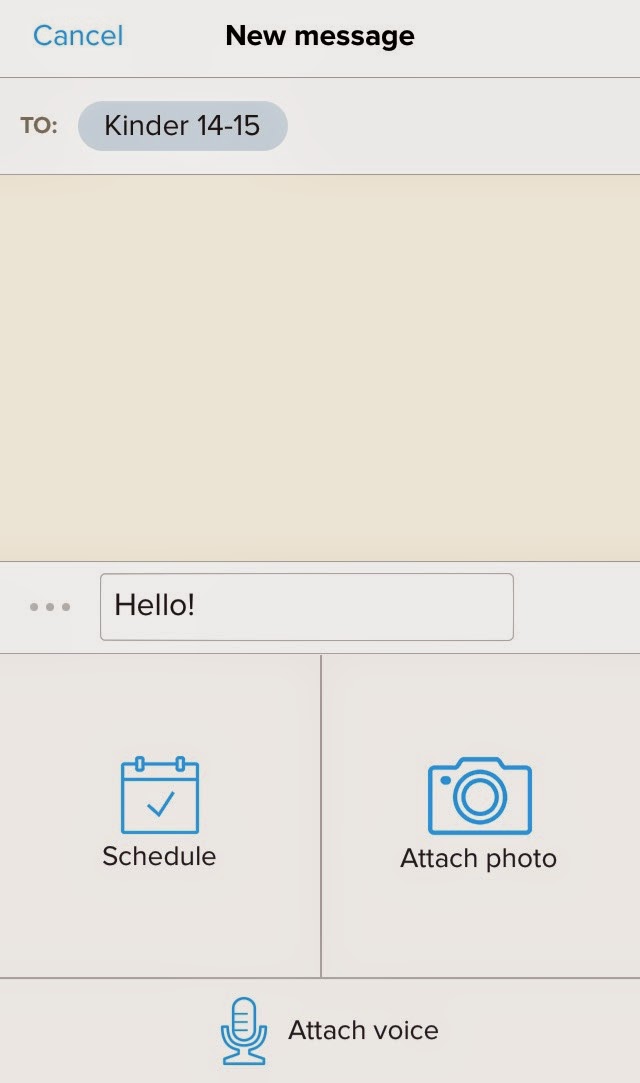
  • Once you have your account set up, your parents invited to subscribe, you can download the app on your cell phone, ipad, etc.  It looks like this... 
 Very user friendly!  You click "to" and select the group you want to text (so this is great for teachers who teach more than one class and may need to connect or relay different information to different groups of parents/students), type your message, attach a picture or voice memo if you would like, and your done!  You can hit "send" OR you can SCHEDULE the text to send on a certain DATE and TIME!!!  So when I send home a permission slip for a field trip, I go ahead and schedule a text to be sent out the day before (2 weeks in advance!!).  I can do it while it's fresh on my mind! Again...genius!!  Below you can see, I keep them short and simple!  A reminder about picture day from back in September and a personal little "happy" that I sent to parents this morning!  We woke up to 4 inches of snow and ice in North Texas, so school was canceled today!  -My kinder friends LOVE seeing pictures of my baby boy! ;)


Have you used Remind before!?